ai-usagebar
A project by Fabio Akita. The GNOME and macOS desktop integrations shown here were written in Samir's fork and adopted upstream.
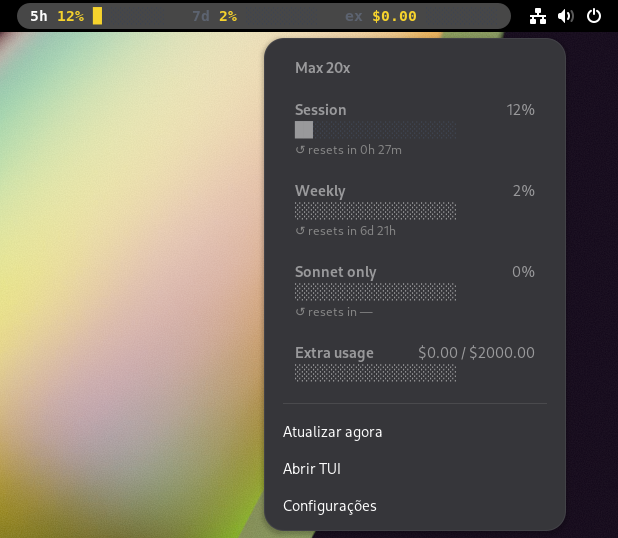
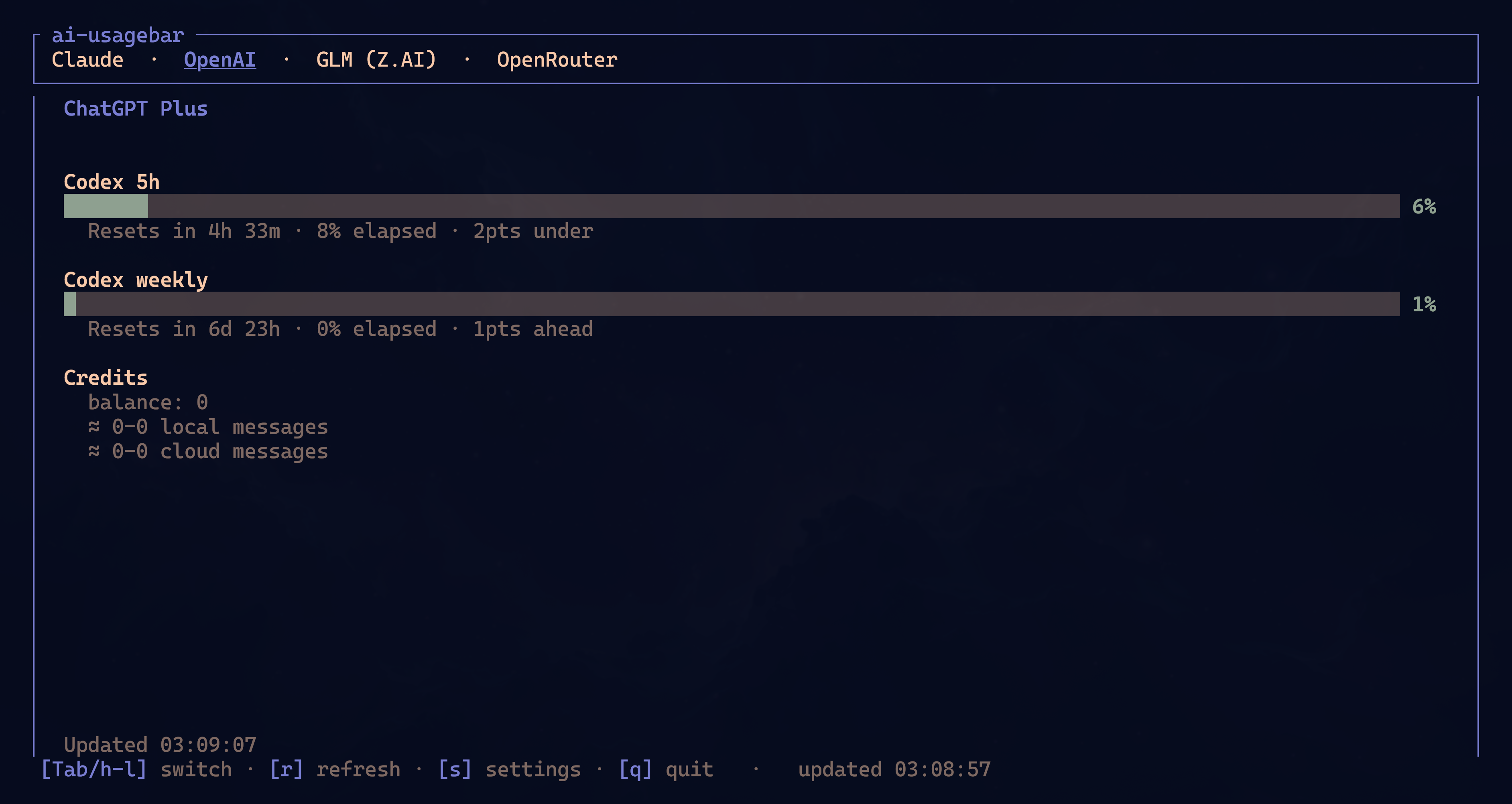
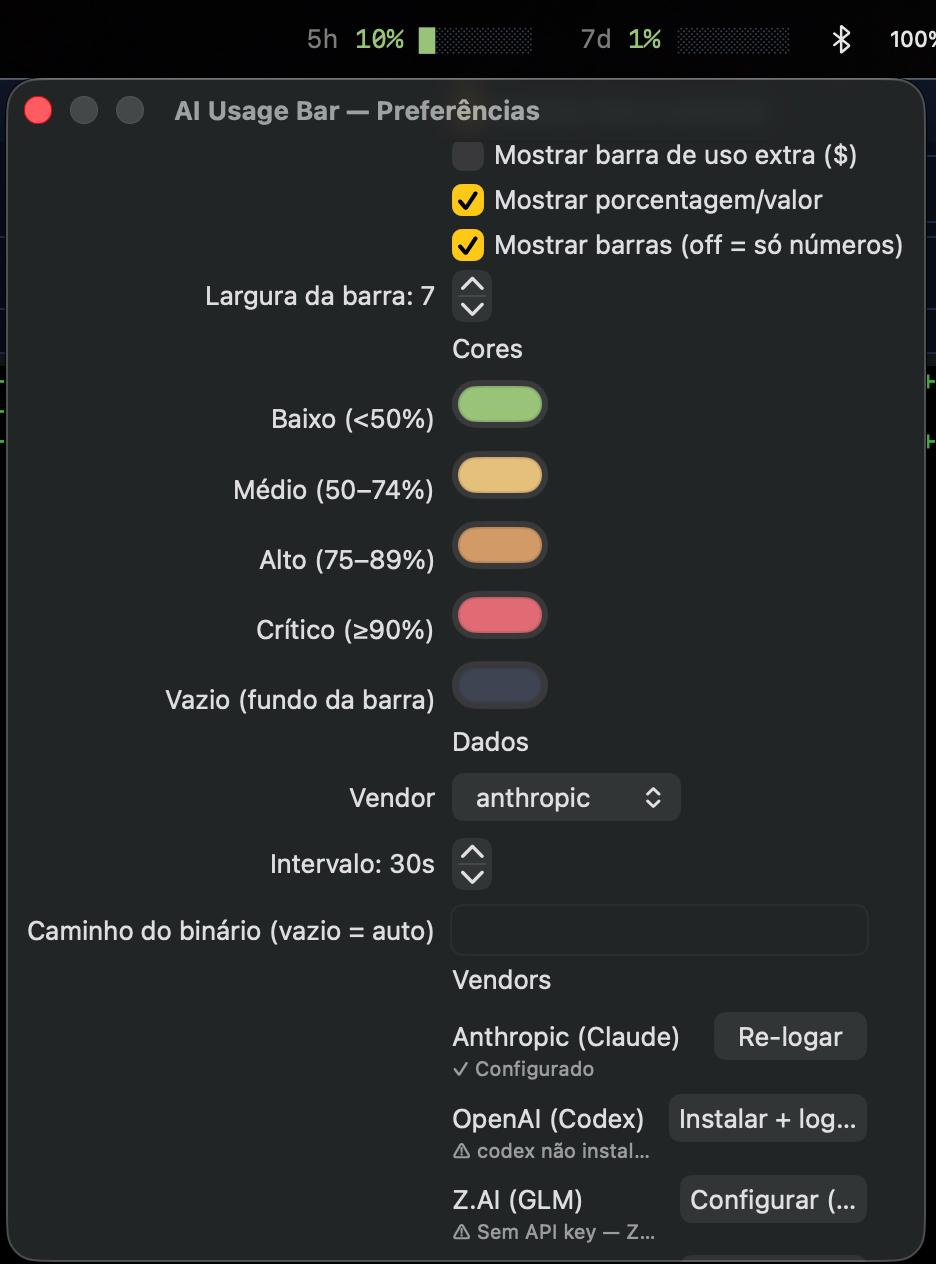
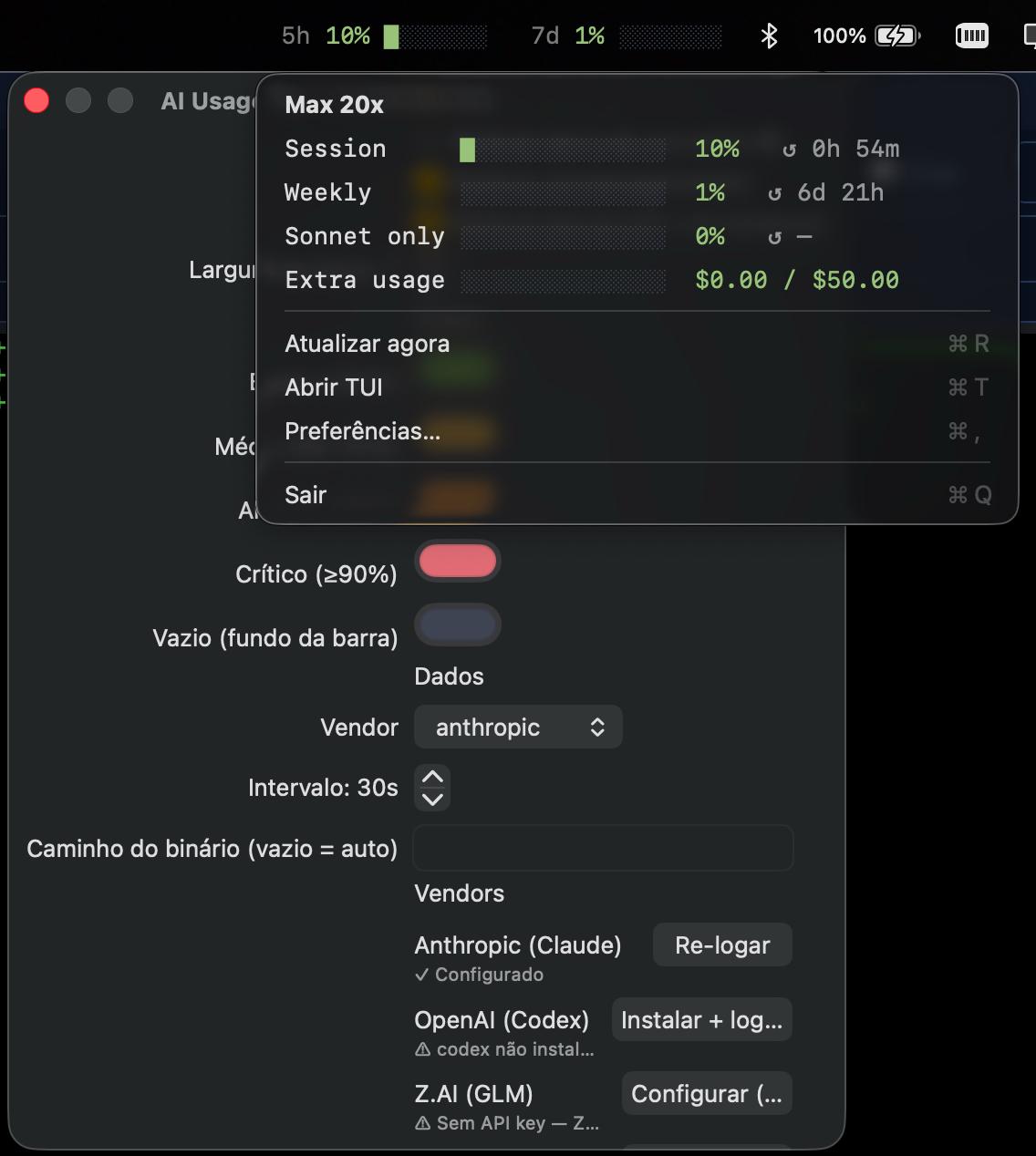
ai-usagebar shows how much of your AI plans you have already used — Anthropic Claude, OpenAI Codex, Z.AI (GLM), OpenRouter, DeepSeek and nine more — right in your system bar, with the usage bars for the 5-hour window and weekly windows beside the clock and a menu holding the full breakdown.
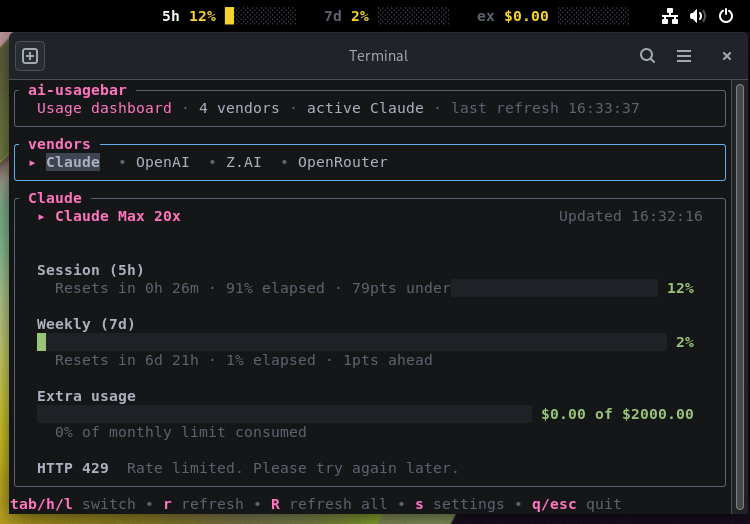
It is a fast Rust backend with three interfaces: the Waybar widget and a terminal TUI (cross-platform), the GNOME Shell extension (Linux) and the menu bar app (macOS). All of them read the same --json from the binary — the authentication logic and each provider live only in the auditable Rust.
Features
Fourteen providers
Claude, Codex, Z.AI, OpenRouter, DeepSeek, Kimi, Grok, MiniMax, ShvIA and more, in one place.
Native UI per OS
Waybar and a GNOME extension on Linux, the menu bar on macOS.
Cross-platform TUI
`ai-usagebar-tui` runs in any terminal, on all three systems, even over SSH.
Auto-refresh
Refreshes every 60s in the app; a flock-guarded cache avoids rate limits.
No re-implemented auth
Reads the OAuth that `claude`/`codex` already wrote; keys via env/config.
Drop-in claudebar
The same flags and placeholders as the original claudebar, in Rust.
First of all: sign in to the provider once
ai-usagebar has no login of its own — it reads the credentials the official CLIs already write. For Claude, run Claude Code once; the token renews itself afterwards.
$ claude        # Linux/Windows → ~/.claude/.credentials.json  ·  macOS → Keychain (read automatically)
$ codex login # OpenAI Codex → ~/.codex/auth.jsonZAI_API_KEY / OPENROUTER_API_KEY / DEEPSEEK_API_KEY environment variable, or inline in ~/.config/ai-usagebar/config.toml). You can also set them straight from the Vendors tab in the UIs.
How to install
Pick your system. The commands are the same as in the official repository.
1. Install the binary
On Arch, use the AUR. On other distros, use crates.io (needs rustup, or cargo-binstall to fetch a prebuilt one).
# Arch (AUR) — pick one:
$ yay -S ai-usagebar-bin     # prebuilt binary from Releases (~5s)
$ yay -S ai-usagebar         # builds from source (~30-60s)

# Other distros (crates.io):
$ cargo install ai-usagebar  # builds from source (needs rustup)
$ cargo binstall ai-usagebar # downloads the prebuilt binary (needs cargo-binstall)Installs ai-usagebar plus ai-usagebar-tui. Test it right away:
$ ai-usagebar --vendor anthropic --pretty   # should print the bars
$ ai-usagebar-tui # tabbed TUI — works on its own, no Waybar2a. GNOME Shell extension
$ cd gnome-extension
$ ./install.sh          # symlink into ~/.local/share + compiles the GSettings schema
# Reload GNOME Shell: LOG OUT / LOG IN (do not use gnome-shell --replace)
$ gnome-extensions enable ai-usagebar@akitaonrails.github.io
$ gnome-extensions prefs  ai-usagebar@akitaonrails.github.io   # bars, colours, Vendor login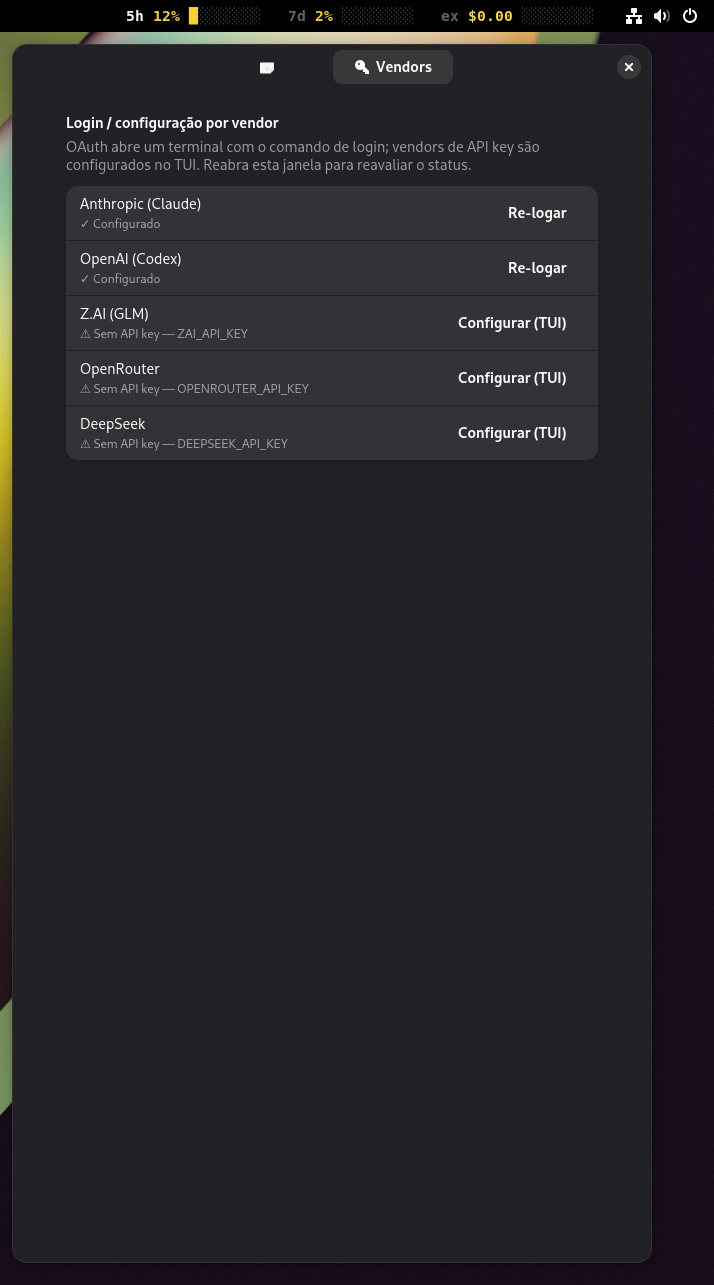
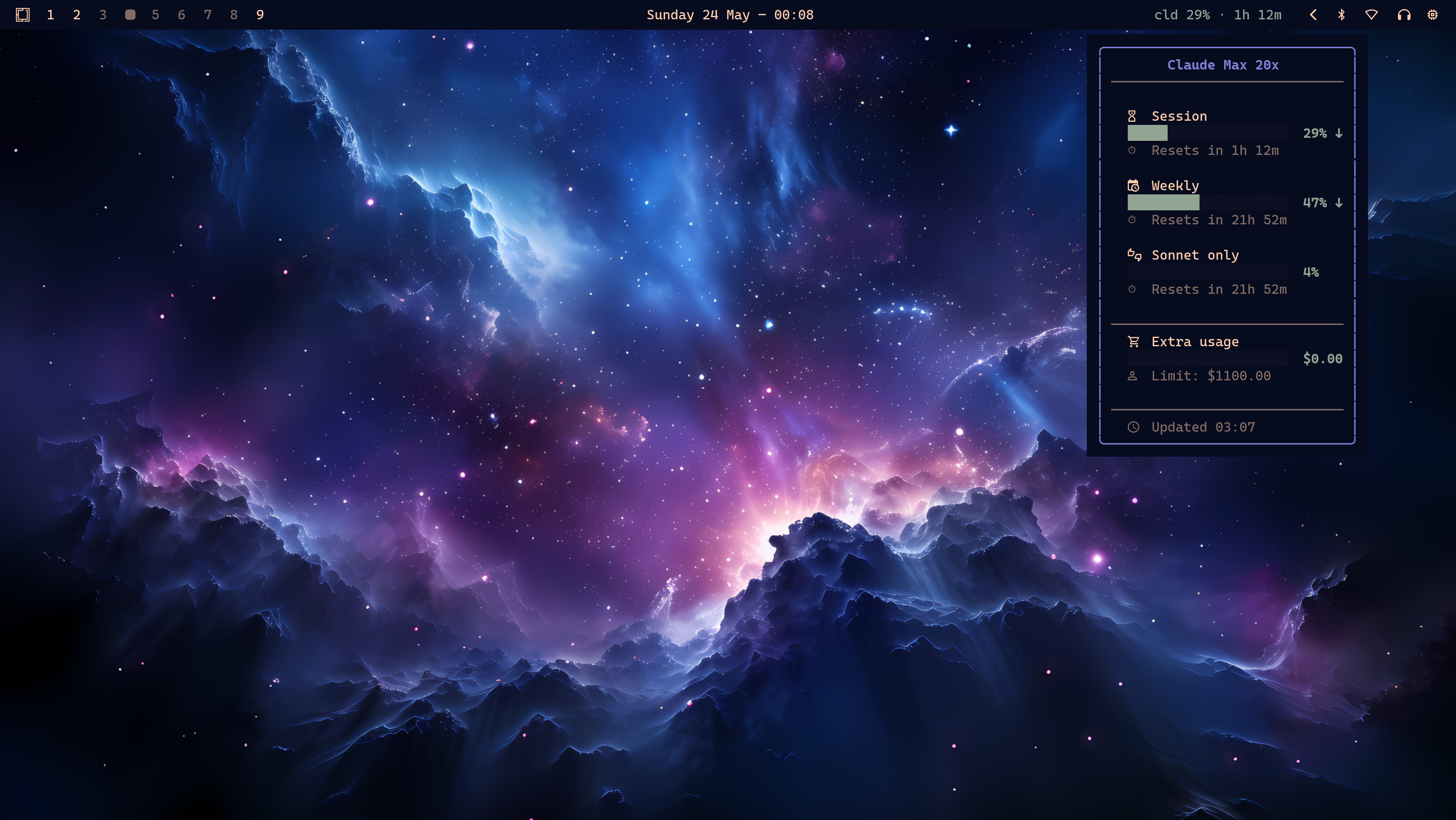
2b. Waybar widget (Wayland)
A single module: scroll to cycle providers, click to open the TUI. Add it to your ~/.config/waybar/config:
"custom/aibar": {
    "exec": "ai-usagebar --format '{vendor_short} {session_pct}% · {session_reset}'",
    "return-type": "json",
    "interval": 300,
    "signal": 13,
    "tooltip": true,
    "on-click": "ai-usagebar-tui",
    "on-scroll-up":   "ai-usagebar --cycle-next",
    "on-scroll-down": "ai-usagebar --cycle-prev"
}interval: 300. The Anthropic and OpenAI endpoints are undocumented and rate-limit below roughly 300s. The internal 60s cache lets several surfaces coexist without exhausting the API.
1. Prerequisites
$ xcode-select --install     # Command Line Tools (for swiftc)
$ cargo install ai-usagebar   # backend in ~/.cargo/bin (needs rustup)
$ claude # log in once — credentials go to the Keychain (read automatically)2. Build and run the menu bar app
$ git clone https://github.com/samirhvbr/ai-usagebar.git
$ cd ai-usagebar/macos
$ ./build.sh                  # swiftc -O → ./ai-usagebar-menubar (no Xcode project)
$ ./ai-usagebar-menubar & # appears in the menu bar (no Dock icon)3. (Optional) start at login
$ ./install-agent.sh # LaunchAgent with RunAtLoad — comes back at every login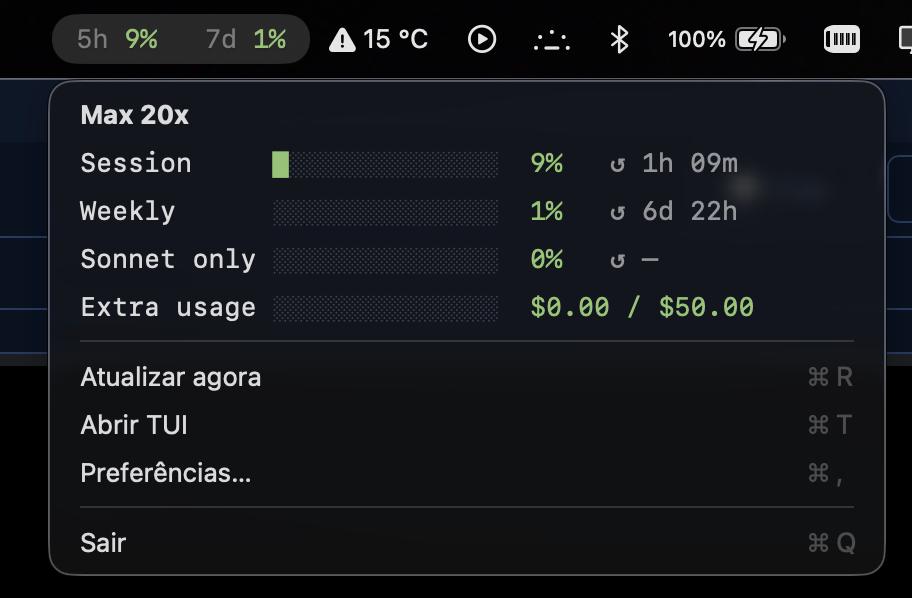
1. Prerequisites
You need the Rust toolchain:
> winget install Rustlang.Rustup2. Build and run
> git clone https://github.com/samirhvbr/ai-usagebar.git
> cd ai-usagebar
> cargo build --release                    # → target\release\
> .\target\release\ai-usagebar-tui.exe     # the full terminal dashboard
> .\target\release\ai-usagebar.exe --pretty # one usage reading, readable%USERPROFILE%\.claude\.credentials.json / %USERPROFILE%\.codex\auth.json — run claude/codex once to create them. No API key is needed for those two: the tool reads the OAuth the official CLIs already wrote.
ai-usagebar-tui and ai-usagebar --json/--pretty.
What changed
The most recent releases, taken from the project's own changelog.
-
v0.16.0 current
- Google Antigravity joins the providers, reporting all four real quota windows — a 5-hour and a weekly limit for each of its two model pools — with no credentials to configure.
- The GNOME extension supports Shell 45 through 50, up from 45–48.
- Tooltip borders no longer come out ragged when a label contains &, < or >.
-
v0.15.0
- The context monitor docks into the dashboard, with a key to cycle full, split and bottom.
- Credit spend is no longer hidden on uncapped plans, and extra usage prints in its own currency instead of a hard-coded dollar sign.
-
v0.14.0
- An opt-in local monitor for Claude Code context, off until you enable it and reading only bounded tails — no filesystem scan.
- Four account-balance providers: Kilo, Novita, Moonshot and xAI/Grok. These show money rather than a usage percentage.
-
v0.13.0
- Kimi joins the providers.
- Pace markers — whether you are ahead of or behind burn pace — reach the macOS menu bar and GNOME.
- Fixes a bar stuck at "Sonnet only 0%", clipped rows in the macOS preferences, and API key names leaking into error text.
-
v0.12.0
- Model-scoped weekly limits are rendered on the desktop surfaces.
Later work in this fork — the ShvIA and MiniMax providers, and the API status panel — has shipped but has not been given a version of its own yet.
ai-usagebar is a project by Fabio Akita — open source (MIT), a Rust port of claudebar with support for more providers. The native GNOME and macOS desktop integrations shown here were written in Samir's fork and adopted upstream. Some endpoints are undocumented; trademarks mentioned belong to their respective owners.